
Web Components
What are Web Components?
They are a new HTML5 standard to build reusable components for the web. They can contain a set of custom elements, Javascript, and styles unique to a specific component.
But first... a little history
Web 1.0
Web 1.0
- Static pages
- Table based layouts
- Animated GIFs
- Very limited CSS selectors
- Everything was built using elements
Web 2.0
Web 2.0
- Dynamic pages
- DIV > Tables
- Enhanced CSS capabilities
- DHTML
- AJAX
- CSS frameworks and libraries
- JS frameworks and libraries
- Plugins
Issues with this approach
- JS & CSS bleeding all over the page
- scoping styles
- specificity conflicts
- body #content .alternative p
- !important
- Non-semantic (descriptive) code.
- "div soup"
DIVs are the new Tables
There must be a better way
What if browsers made it easier to build modular, more encapsulated code?
What if we could teach new elements to the browser?
Web Components to the rescue!

So what are exactly Web Components?
- Custom Elements
- HTML Templates
- Shadow DOM
- HTML Imports
Current way of doing things
(Yesterday)
vs
Web Components
(Today)
Bootstrap Grid
Yesterday
        ...
        ...
Today
        ...
        ...
Tabs
Yesterday
Today
    Home
    Profile
    Messages
Custom Elements
Custom Elements enable developers to create their own custom HTML/DOM elements. It enables easier component reuse.
Let's create a custom element
var XFoo = document.registerElement('x-foo');
Now you can use <x-foo> wherever you want in the document.
By default, custom elements inherit from HTMLElement. The example above is equivalent to
var XFoo = document.registerElement('x-foo', {
  prototype: Object.create(HTMLElement.prototype)
});
JS only
var XJS = document.registerElement('x-js');
document.body.appendChild(new XJS());
or
document.registerElement('x-jsx');
document.body.appendChild(document.createElement('x-jsx'));
Rules
You need to have at least one '-' inside the name of your custom element.
Any tag names without '-' will result in an error.
Good :)
x-component
x-web-component
Bad :(
xcomponent
x_component
Extending native elements
(Type Extension Custom Element)
You can create a custom element that extends a native HTML element's features.
var XFoo = document.registerElement('x-foo', {
  extends: 'input',
  prototype: Object.create(HTMLInputElement.prototype)
});
To use the element, use the original tag and specify the custom tag name using the "is" attribute.
What is the benefit of this?
The benefit of extending native elements is that even if JS is turned off or the browser doesn't support Custom Elements, the element will still show, but fallback to it’s base state.
Example
JS enabled

JS disabled

Lifecycle callbacks
.createdCallback() //Called after the element is created.
.attachedCallback() // Called when the element is attached to the document.
.detachedCallback() // Called when the element is detached from the document.
.attributeChangedCallback() // Called when one of attributes of the element is changed.
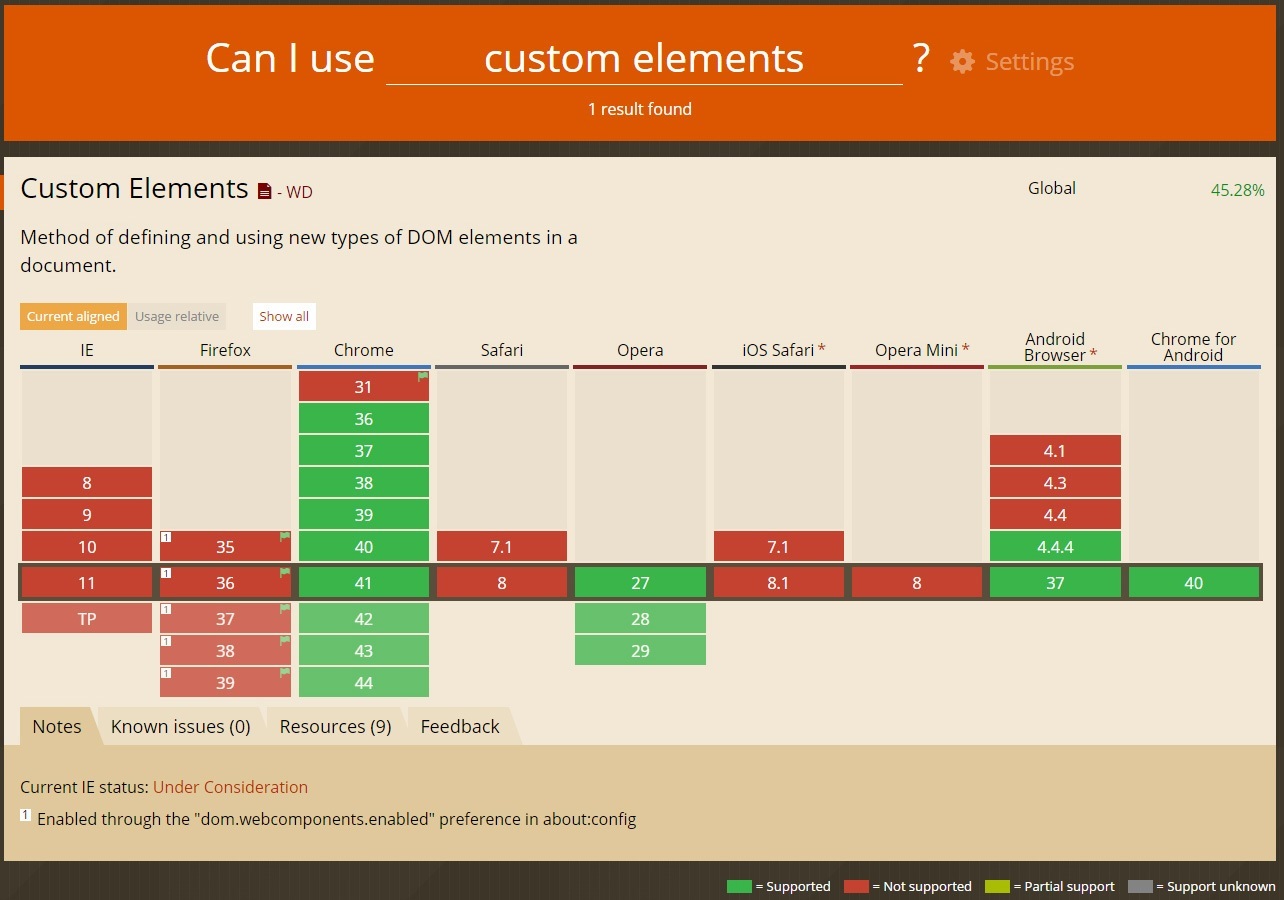
Browser Support
HTML Templates
Setup
Web Components

To load onto page.
Benefits
- Markup is hidden DOM and does not render until it is activated
- Scripts don't run, images don't load, audio doesn't play until the template is used
- Templates can be placed anywhere inside of <head> and <body>
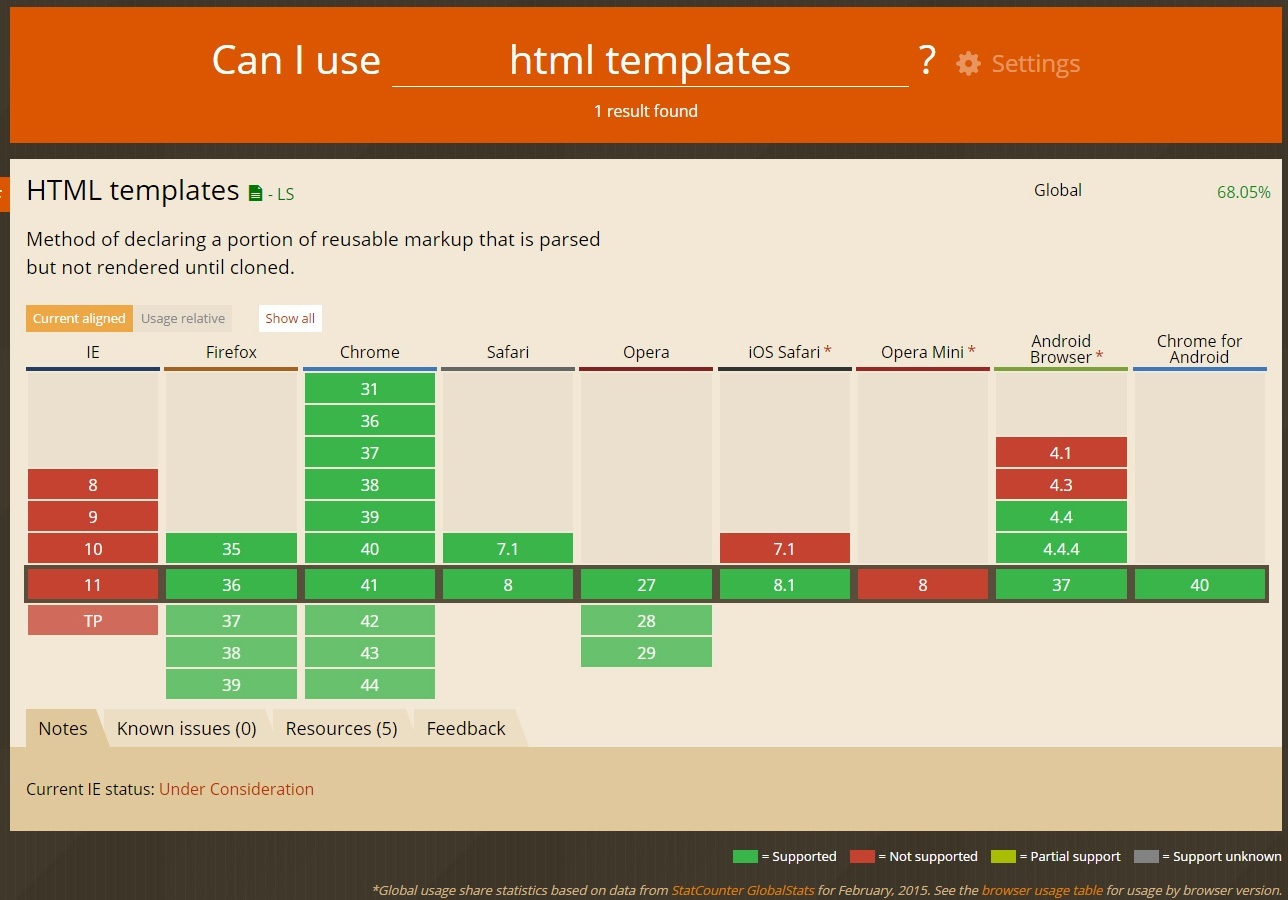
Browser Support
Shadow DOM
With a Shadow DOM it is finally possible to write CSS rules that aren't global, enabling true modular development.
What is a Shadow DOM?
An element that has a shadow root associated with it is called a shadow host. The shadow root can be treated as an ordinary DOM element so you can append arbitrary nodes to it.
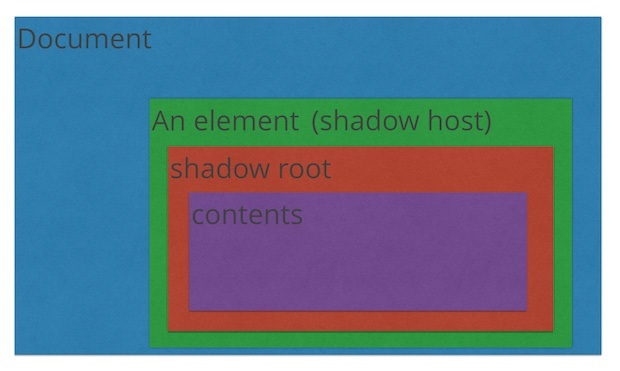
All markup and CSS are scoped to the host element.
CSS styles defined inside a Shadow Root won't affect its parent document and CSS styles defined outside the Shadow Root won't affect the main page.
var host = document.querySelector('button'),
    root = host.createShadowRoot();

root.textContent = 'Hello, from the shadow world!';
Combining with HTML Templates
See the Pen HTML Template and Shadow Dom by Tim Mansell (@TimMansell) on CodePen.
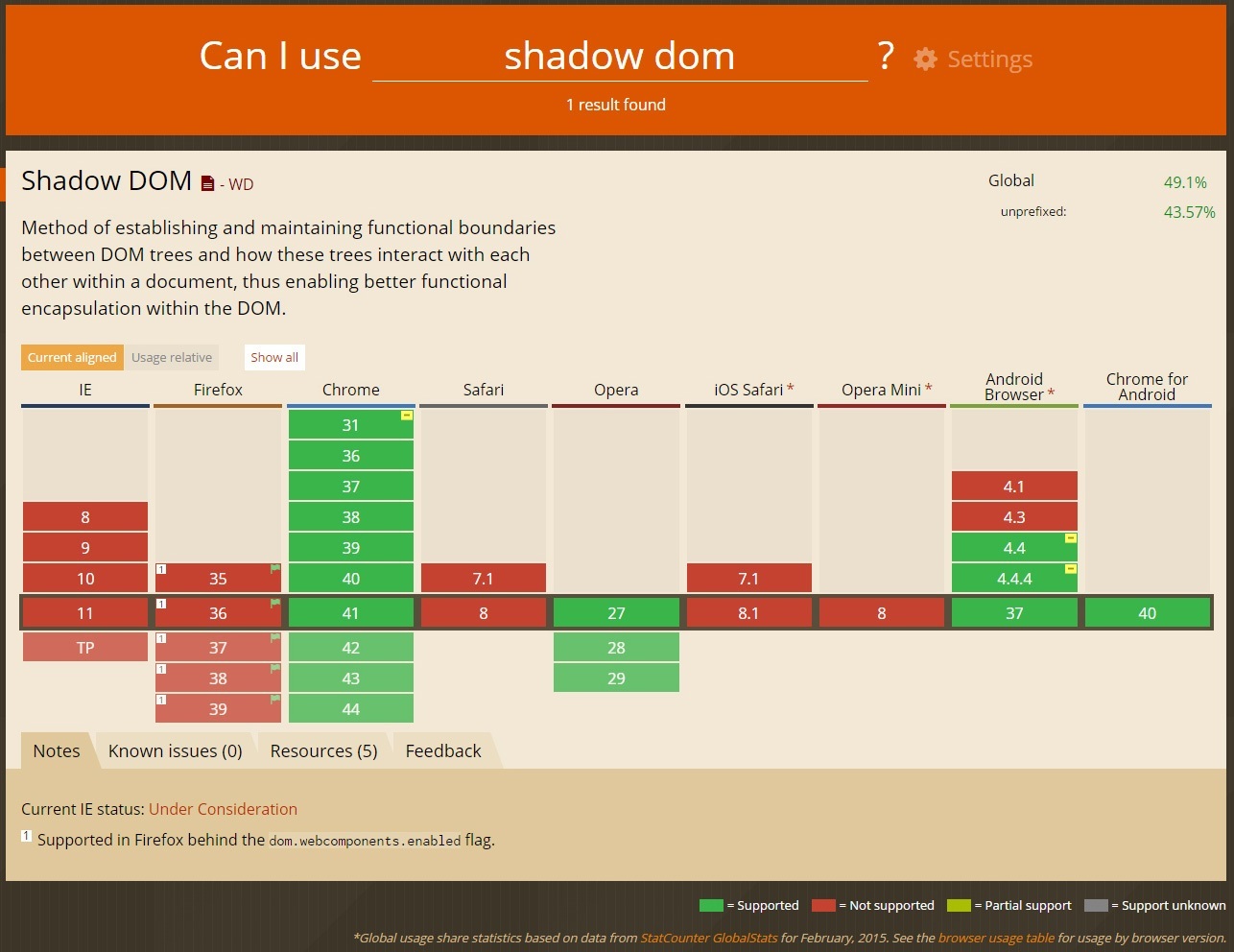
codepen.io/TimMansell/pen/embbYyBrowser Support
HTML Imports
HTML Templates, Shadow DOM, and Custom Elements enable you to build components easier than before. But it's not efficient to load resources such as HTML, CSS, and JS separately.
HTML Imports allow you to load those resources as a single HTML file.
Let’s put it all together
x-component.html
index.html
<head>

</head>

<body>

        This is Custom Element

</body>
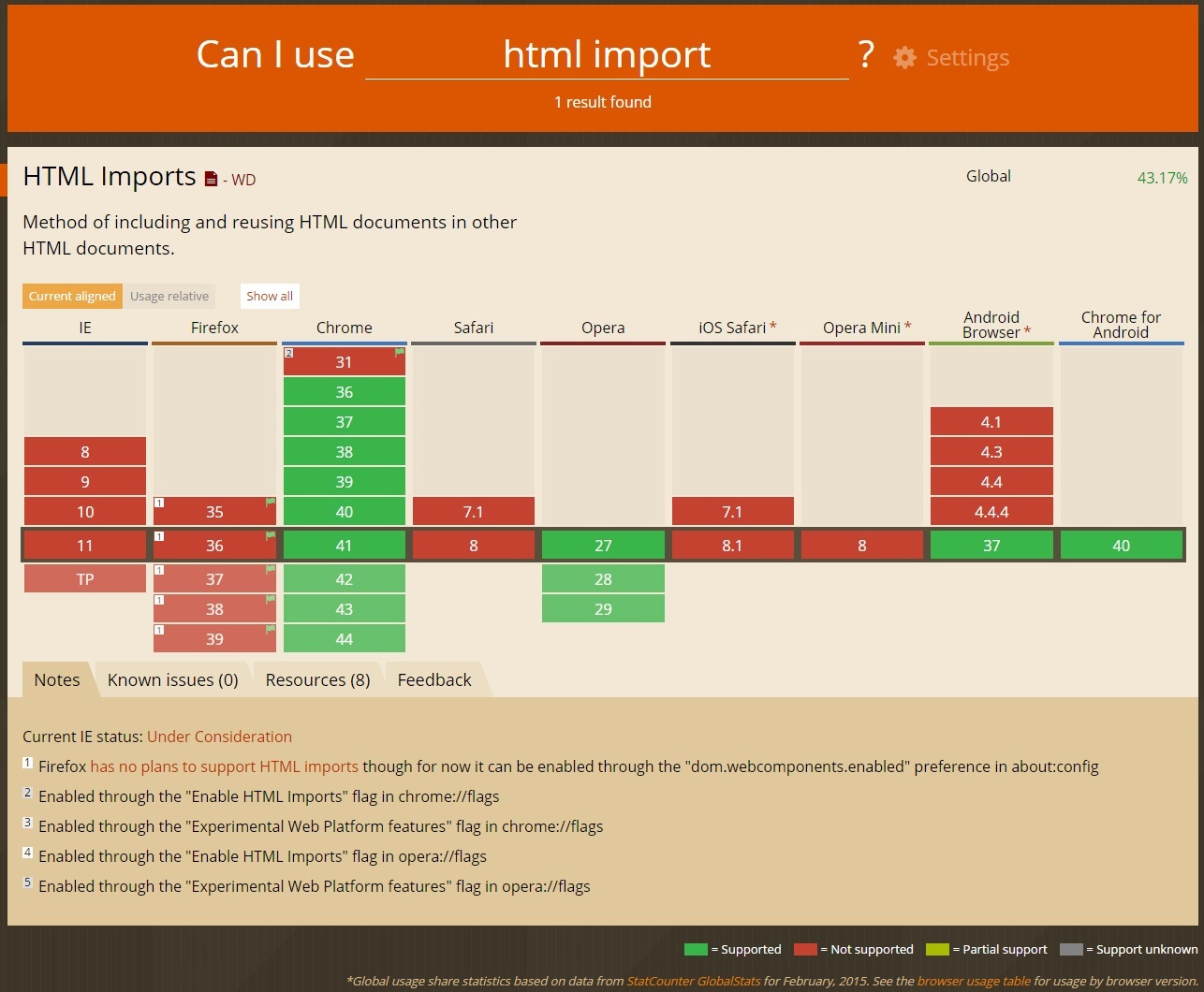
Browser Support
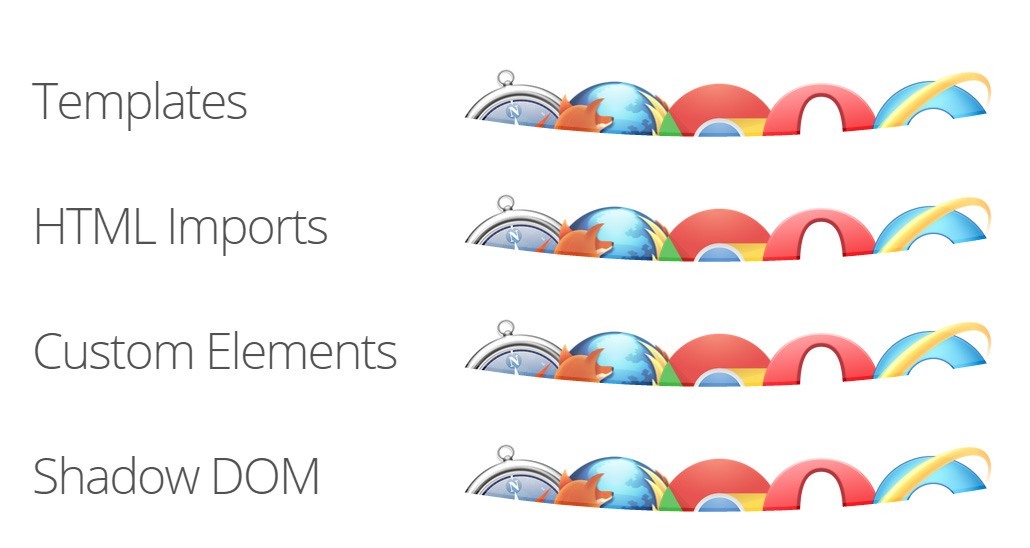
TIL that we're all using
Web Components
What about SEO?
“Because Polymer makes use of polyfills, search engines should treat Polymer-based applications no differently than they do other javascript-based web apps. In fact, Google’s crawler understands JavaScript heavy applications.Going forward, it is a reasonable assumption that as use of native Shadow DOM increases, search engine providers will try to adapt to understand it, just as they have adapted to other new web technologies in the past.”Polymer Team
Accessibility you say?
“Results from initial testing indicate that inclusion of ARIA roles, states and properties in content wholly inside the Shadow DOM works fine. The accessibility information is exposed correctly via the accessibility API. Screen readers can access content in the Shadow DOM without issue.“
Steve Faulkner
http://www.paciellogroup.com/blog/2012/07/notes-on-web-components-aria/
“Web Components, including Shadow DOM, are accessible because assistive technologies encounter pages as rendered, meaning the entire document is read as “one happy tree”.
Marcy Sutton
http://substantial.com/blog/2014/02/05/accessibility-and-the-shadow-dom/
So we can start using it now,
Yeah?
You sure can!
But what about IE?
Pollyfills
"a polyfill (or polyfiller) is downloadable code which provides facilities that are not built into a web browser. It implements technology that a developer expects the browser to provide natively, providing a more uniform API landscape."
Browser Support

Polymer is a library that uses the latest web technologies to let you create custom HTML elements.
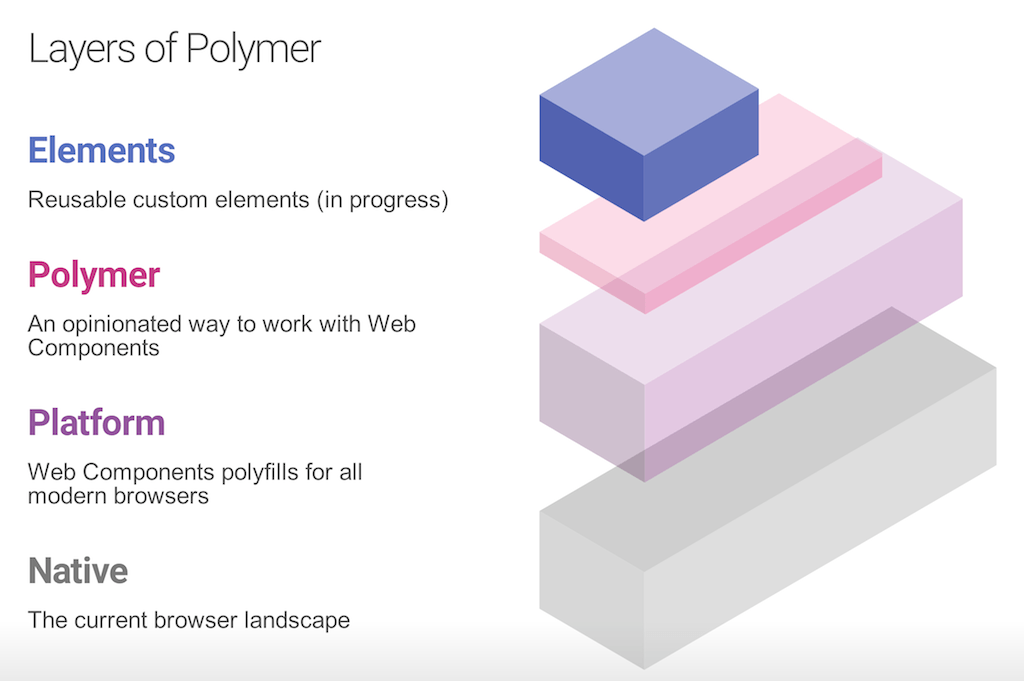
Everything is an element
Visual Elements
<paper-toggle-button> Demo
<paper-tab> Demo
<paper-dialog> Demo
<core-toolbar> Demo
<core-collapse> Demo
<core-image> Demo
utility elements
<core-ajax> Demo
<core-dropdown-menu> Demo
<core-icon> Demo
<core-media-query> Demo
<core-scaffold> Demo
Creating an element
I'm inside the element!
Using an element
Import
<head>


</head>
Use

Out in the wild
<google-map></google-map>
<chart-elements></chart-elements>
<x-piano></x-piano>
<x-gangnam-style></x-gangnam-style>
<polymer></polymer>
customelements.io
a web components gallery for modern web apps
Food for thought
What if the entire web platform was hosted on Github?
github.com/domenic/html-as-custom-elements